MMUP UPDA Second Attempt / Fourth Attempt Grievance
A step-by-step guide for engineers in Qatar re-applying for the 2nd and 4th chances in the UPDA exam, or appealing a category or grade decision, through the MME engineers committee portal.
5 steps to submit your grievance
Many engineers ask how to apply for an appeal for a re-test or for category and grade issues. Follow these steps on the MME website. Arabic menu names are shown to help you find the right link.
Open the MME website in Arabic
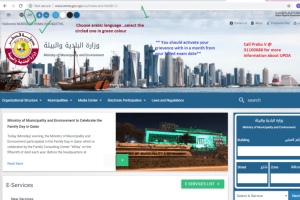
Open the Ministry of Municipality (MME) website and switch the language to Arabic using the AR icon at the top of the page.
Time limit: apply for your grievance within 30 days from your failed exam date.
Select the engineers committee service
In the services list, click the helmet icon, which is the Engineers Admission and Classification Committee.
لجنة قبول وتصنيف المهندسينOpen the grievance e-service
On the committee page, use the right-hand list and click the electronic grievance service, which is the second link from the bottom.
خدمة تظلمات لجنة قبول المهندسين (إلكترونية)Choose Submit Grievance
The next page offers two options: follow up on your grievances, and submit grievances. Click the submit option.
تقديم التظلماتChoose the appeal, upload documents, paste your letter
You are directed to a page where you choose which appeal to apply for. After choosing, upload your supporting documents, such as certificates and IDs, then paste your appeal letter into the box below.
How to prepare your appeal letter
The letter is pasted into the box on the final page, and it must be in Arabic.
Prepare the complete appeal letter in English.
Use Google Translate, paragraph by paragraph, and do it yourself first.
Have your Arabic translator finalise it, then copy and paste it into the box.
Certificates, IDs and any other documents that support your case.
How to check your grievance result
Use the same portal in Arabic and follow the grievances tracking option.
Supporting documents and services
Links for the accounts, certificates and tools you may need while preparing your documents.
Hukoomi account
A Hukoomi account is needed for the government e-services. Register a new account or visit a service centre.
MOFA attestation
Ministry of Foreign Affairs attestation for the PCC and degree certificates.
Indian PCC
For Indian nationals: the Indian Cultural Centre and the Embassy of India in Qatar.
Metrash2 app
The Ministry of Interior app used for government services. Upload files below 100 KB where required.
Document tools
Free online tools to convert, combine and shrink your files before uploading.
This process might be changed by MMUP/MME at any time, including the website and its appearance.
Preparing for the UPDA exam?
Green International, Qatar offers UPDA exam preparation with a customised syllabus, exam-focused study material, live training, simulation-based mock tests and free MME documentation submission support. Our expert consultants guide you until you achieve MME registration.
Learn the full process: UPDA Exam Registration Procedure